Posts

Deflection angle for idle gear development

Image
   When I develop the machine, I used to use some formulars in textbook which I studied at my university. I used the Castigliano's theorems so often and several cases were already solved so I just needed to apply it to my real case. But below case was not in my textbook, which I needed this case for my idle gear development so I made it by myself. M A B = − M ′ − F a c l M B C = − M ′ + F ( c − l − a ) M_{AB} = -M' - \frac{F a c}{l} \qquad M_{BC} = -M' + F(c - l - a) ∂ M A B ∂ M ′ = − 1 ∂ M B C ∂ M ′ = − 1 \frac{\partial M_{AB}}{\partial M'} = -1 \qquad \frac{\partial M_{BC}}{\partial M'} = -1 θ A = ∫ 0 l + a M ( ∂ M ∂ M ′ ) d c E I , (where M ′ = 0) \theta_A = \int_0^{l+a} M \left( \frac{\partial M}{\partial M'} \right) \frac{dc}{EI} \quad,\quad 2M' = 0 = ∫ 0 l − F a c l ( − 1 ) d c E I    +    ∫ l l + a F ( x − l − a ) ( − 1 ) d c E I = \int_0^l -\frac{F a c}{l} (-1) \frac{dc}{EI} \;+\; \int_l^{l+a} F(x - l - a)(-1)\frac{dc}{EI} ​ = F a E I ∫ 0 l x l d ...

Profile shifted gear addendum and tip diameter

Image
 I worked in R&D for transmission development. I used to study by myself to prove any formular for better understanding. Sometimes I look back my documents and surprised to myself how I did this all. Below is to find the reason why profile shifted gear addendum and tip diameter is decided by center distance correction coefficient and profile shift coefficient of partner gear. I was wondering why some gear specs is decided by partner gear's specification so I calculated to see it. Addendum and Dedendum based on gear 1's reference circle is as below. Addendum = ( 1 + y − x 2 )   m (1 + y - x_2)\,m Dedendum = ( 1.25 − x 2 )   m Total depth = Addendum + Dedendum = ( 2.25 + y − ( x 1 + x 2 ) )   m The clearance between 2 gears are same as length of AB. A  ⁣ B = ( 1.25 − x 2 ) m − { ( 1 + y − x 2 ) m − y m } A\!B = (1.25 - x_2)m - \{(1 + y - x_2)m - y m\} = 0.25   m = \boxed{0.25\,m} ​ ​ This proves that even after profile shift is applied, to meet the clearance (0.25m) between...

Gear working pressure angle

Image
For beginner member in R&D, I always used to recommend to prove some formulars by themselves. By doing so, they can remember it better and apply it to another area better.  Regarding gear in machine, pressure angle and correction coefficient of center distance can be obtained from the following calculation. Note that even when gear has profile shift, base diameter doesn't change. d ′  cos α ′  =  d b (base diameter) ​ d  cos α  =  d b (base diameter) ​ ​ \Rightarrow\ d' \cos \alpha' = d \cos \alpha ⇒    d ′  cos α ′  =  d  cos α cos ⁡ α ′ = d d ′  cos ⁡ α = cos ⁡ α ⋅ a 0 a a : actual center distance a0 : standard center distance where a 0 = r 1 + r 2 2  m a_0 = \frac{r_1 + r_2}{2} \text{ ?} Finally then I can get, ∴   α ′ = cos ⁡ − 1 ( cos ⁡ α 2 λ z 1 + z 2 + 1 ) \therefore\ \alpha' = \cos^{-1} \left( \frac{ \cos \alpha }{ \frac{2\lambda}{z_1 + z_2} + 1 } \right) This working gear pressure angle is us...

Ads not showing and debugging

Image
This project was based on below environment. Expo bare project ( npx expo prebuild ) with template TypeScript. expo: 54.0.23 react-native: 0.81.5 react-native-google-mobile-ads: 16.0.0 Suddenly Ads were not working! Yesterday they were all fine, all ads were showing correctly. But now Banner area empty, rewarded ads not loaded (if not loaded, gray inactivated button)  I didn't change anything from yesterday. No package added, no coding editied, it was same as before, but just 1day after, it's not working. I have banner, interstitial, rewarded ads but they all are not showing. The first thing I tried was making bare project again. Simply erase android, ios folder and make it again with expo prebuild. $ rm -rf android ios $ npx expo prebuild $ npx expo start:android Ads still not showing. So this time I tried to wipe data in simulator and even delete the simulator and made it again. Not working. I started to doubt about some AdMob server error, since I heard rec...

Rewarded Ads logic and debugging

Image
  This writing is about how I make some logic to show the correct hint in Sudoku after watching Google AdMob rewarded ads. The project is based on expo bare project with package, react-native-google-mobile-ads. This project was based on below environment. Expo bare project ( npx expo prebuild ) with template TypeScript. expo: 54.0.23 react-native: 0.81.5 react-native-google-mobile-ads: 16.0.0 What I was trying to achieve is that in the hint modal, if I touch the WATCH AD button, it shows rewarded ads from Google AdMob. After watching it, hint modal should be closed automatically and 1 hidden sudoku number should appear in random as a reward. The first challenge that I encounter was that the reward action was not carried out at the first ads watch. From the second ads watch reward action was carried out well, but not the first one. After several trial and error I found that it was because when reward action function was called it referred old status of the function so first reward w...

Clock app logic with Hooks

Image
This writing is continued article from previous one. This  article explains how to use setInterval function and Hooks to make mobile clock application with react native. 1. setInterval function setInterval is basic function included in JavaScript. It calls call-back function at every intervals (milliseconds). setInterval function returns id value, so when it is not used anymore, clearInterval should be used to prevent unnecessary memory use. const id = setInterval(callBackFunction, interval) callBackFunction = () => {} clearInterval(id) For the app to show the real time in every second unit, code will be as below. But below example calls setInterval function whenever App is newly rendered every second. setInterval  should be called only at the first time when rendered. For this kind of issue, useEffect hook is used. export default function App() { let time = new Date () const id = setInterval(() => { time = new Date () /...

Clock app style with Font and Date class

Image
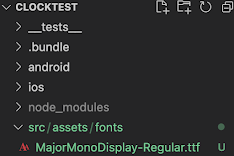
For developing clock application with react native and typescript,  this writing explains how to use Fonts and Date class, which is embedded in Javascript. 1. How to use Fonts Make project to develop mobile clock application. Install CocoaPods during making project. $ npx @react-native-community/cli@latest init ClockTest react-native-template-typescript This application would use font, Major Mono Display. This font make the clock app look digital clock. Download font in this link:  https://fonts.google.com/specimen/Major+Mono+Display Download, unzip the font file, MajorMonoDisplay-Regular.ttf Make the directory src/assets/fonts and move the font file here. $ cd ClockTest $ mkdir -p src/assets/fonts -p option here means --parents and it make parent directories when needed. If it is already existing, no error. Make react-native.config.js file in the project root directory. Root directory means where package.json file is located. $ touch react-native.config.js M...